Subscription Plans
Understand Kuviq subscription tiers and features.
Overview
Kuviq offers flexible subscription plans to fit organizations of all sizes:
- Free Trial - Try all features before committing
- Starter - For small teams getting started
- Professional - For growing organizations
- Enterprise - For large organizations with advanced needs
Plan Comparison
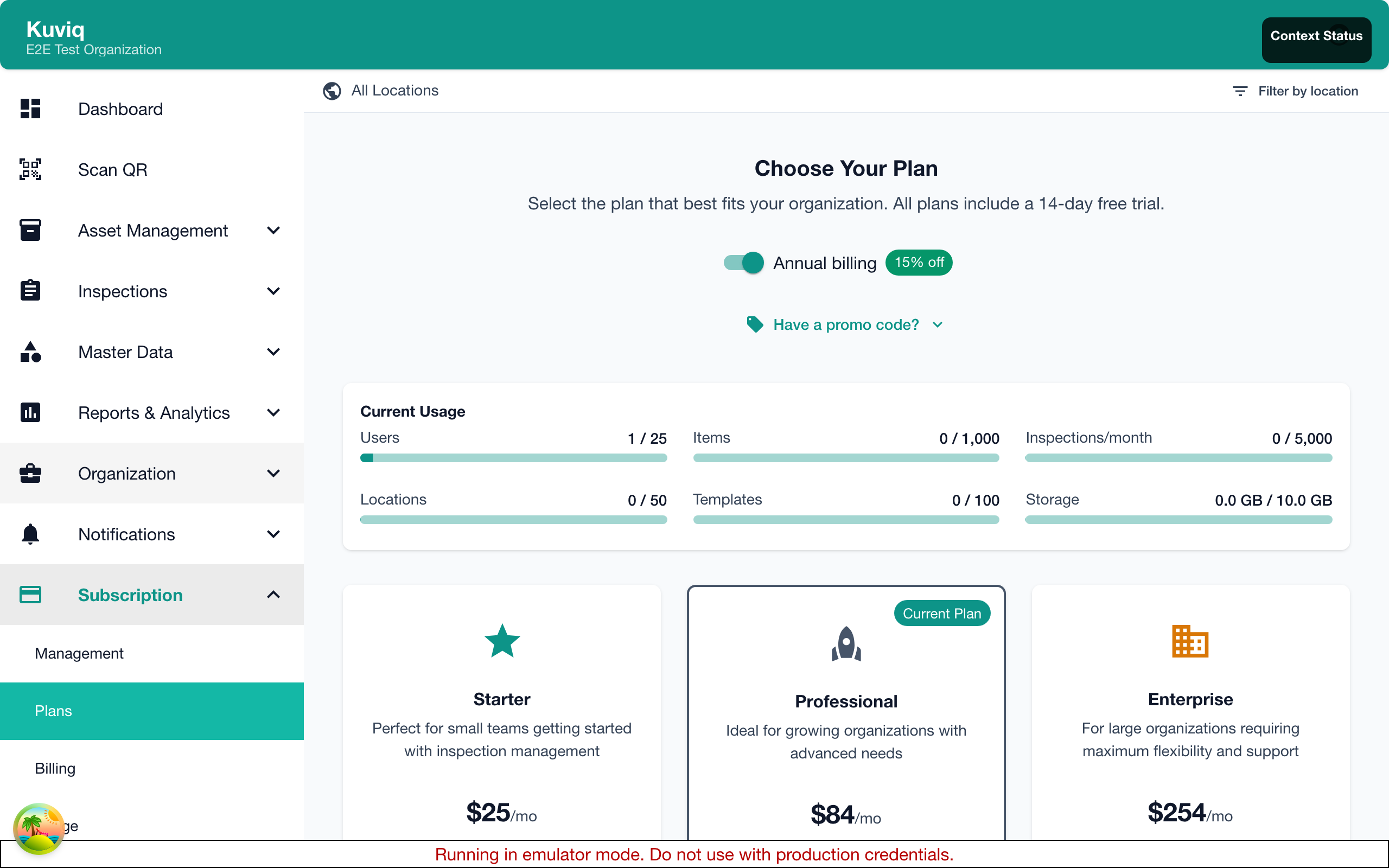
Feature Comparison
| Feature | Starter | Professional | Enterprise |
|---|---|---|---|
| Items | Up to 50 | Up to 500 | Unlimited |
| Users | Up to 5 | Up to 25 | Unlimited |
| Locations | Up to 5 | Unlimited | Unlimited |
| Inspection Templates | 5 | Unlimited | Unlimited |
| Custom Fields | Basic | Full | Full |
| QR Code Generation | Yes | Yes | Yes |
| Photo Documentation | Yes | Yes | Yes |
| Basic Reports | Yes | Yes | Yes |
| Advanced Reports | No | Yes | Yes |
| Scheduled Reports | No | Yes | Yes |
| Corrective Actions | Basic | Full | Full |
| API Access | No | Yes | Yes |
| Custom Integrations | No | No | Yes |
| Priority Support | No | Yes | Yes |
| Dedicated Support | No | No | Yes |
| Custom Training | No | No | Yes |
| SLA Guarantee | No | No | Yes |
Limits Summary
| Limit | Starter | Professional | Enterprise |
|---|---|---|---|
| Items | 50 | 500 | Unlimited |
| Users | 5 | 25 | Unlimited |
| Locations | 5 | Unlimited | Unlimited |
| Templates | 5 | Unlimited | Unlimited |
| Storage | 5 GB | 50 GB | Unlimited |
User limits above represent the included seats in each plan. Additional users beyond the included seats are billed as per-seat overages. See Billing for details.
Plan Details
Starter Plan
Best for: Small teams, single locations, getting started.
Includes:
- Track up to 50 items
- 5 team members
- 5 locations
- 5 inspection templates
- QR code scanning and printing
- Photo documentation
- Basic reporting
- Email support
Use cases:
- Small businesses
- Single location operations
- Trial users ready to commit
- Basic compliance needs
Professional Plan
Best for: Growing teams, multiple locations, advanced needs.
Includes everything in Starter, plus:
- Track up to 500 items
- 25 team members
- Unlimited locations
- Unlimited inspection templates
- Advanced reporting and analytics
- Scheduled report delivery
- Full corrective action workflow
- API access for integrations
- Priority email and chat support
Use cases:
- Multi-site operations
- Growing organizations
- Compliance-focused industries
- Integration requirements
Enterprise Plan
Best for: Large organizations with complex requirements.
Includes everything in Professional, plus:
- Unlimited items
- Unlimited users
- Custom integrations
- Single Sign-On (SSO)
- Advanced security features
- Dedicated account manager
- Custom training and onboarding
- Service Level Agreement (SLA)
- Custom feature development
Use cases:
- Large enterprises
- Regulated industries
- Complex integration needs
- High-volume operations
Choosing the Right Plan
Consider Your Needs
Ask yourself:
- How many items? - Count equipment you'll track
- How many users? - Count team members needing access
- How many locations? - Count physical sites
- Reporting needs? - Basic or advanced analytics?
- Integration needs? - Need API or custom integrations?
- Support needs? - Standard or priority support?
Growth Planning
Plan for growth:
- Start with current needs
- Consider 12-month projection
- Upgrade is easy; just change plans
- No penalty for starting smaller
Common Scenarios
| Scenario | Recommended Plan |
|---|---|
| Just trying Kuviq | Free Trial → Starter |
| Small team, one site | Starter |
| Multiple sites, growing | Professional |
| Enterprise compliance | Enterprise |
| Need integrations | Professional or Enterprise |
| Heavy inspection volume | Professional or Enterprise |
Free Trial
Trial Details
- Duration: Varies by plan (default 14 days, may differ for Enterprise evaluations)
- Access: Full feature access (Professional level). Admins can configure which Professional features are enabled during trial.
- Limits: 50 items, 10 users
- Credit card: Not required to start
- Extension: Available upon request
- Onboarding: In-app guided checklist with progress tracking
After Trial
Options when trial ends:
- Subscribe - Choose a paid plan
- Extend - Request trial extension
- Pause - Data retained for 30 days
- Export - Download your data
Trial to Paid Transition
- Go to Admin > Subscription
- Click Subscribe
- Select plan
- Enter payment information
- Confirm
Your data transfers seamlessly.
Upgrading Your Plan
When to Upgrade
Upgrade when:
- Approaching item or user limits
- Need features from higher tier
- Growing to more locations
- Requiring advanced reporting
- Needing API access
How to Upgrade
- Go to Admin > Subscription
- Click Upgrade on the plan you want
- Select billing cycle (Monthly or Annual) if changing
- Review changes and pricing
- Confirm
Upgrade Billing
- Immediate access - New features available right away
- Prorated billing - Pay difference for current period
- Billing cycle preserved - Your current billing cycle (monthly/annual) is maintained unless you change it
- Next period - Full new plan price at your selected billing cycle
Downgrading Your Plan
When to Downgrade
Downgrading may be appropriate if:
- Team size decreased
- Item count reduced
- Feature needs changed
How to Downgrade
- Contact support or go to Admin > Subscription
- Click Change Plan
- Select lower tier
- Review implications
- Confirm
Downgrade Considerations
Before downgrading, verify:
- Item count fits new limits
- User count fits new limits
- Location count fits new limits (Starter)
- You won't need removed features
What Happens
- Takes effect at next billing cycle
- Access continues until then
- Features may become read-only
- Data is preserved within limits
Billing Cycles
Kuviq offers two billing options: monthly and annual. You can switch between them at any time.
Monthly Billing
- Billed: Every month on the same date
- Flexibility: Maximum flexibility - cancel or change anytime
- Cost: Standard monthly rate
- Best for: Organizations that prefer month-to-month commitment
Annual Billing
- Billed: Once per year on your subscription anniversary
- Savings: 15% discount compared to monthly billing
- Commitment: 12-month commitment
- Best for: Stable organizations looking to save money
- Example: If monthly is $99/month, annual is $1,008/year (saves $180/year)
Switching Billing Cycles
You can change your billing cycle at any time:
- Go to Admin > Subscription
- Find your current plan card
- Use the Billing Cycle toggle to switch between Monthly and Annual
- Review the pricing change
- Confirm the switch
What happens when you switch:
- Monthly → Annual: You'll be charged a prorated amount for the remaining time in your current billing period, then switch to annual billing
- Annual → Monthly: Your subscription will switch to monthly billing at the end of your current annual period, or you can switch immediately with proration
Proration:
-
When switching cycles mid-period, you'll be charged or credited a prorated amount
-
This ensures you only pay for the time you use at each billing rate
-
Monthly → Annual: Takes effect immediately
-
Annual → Monthly: Takes effect at renewal
Promo Codes
Apply promo codes when subscribing or changing plans to receive discounts:
- During checkout, enter your code in the Promo Code field
- Click Apply to see the discounted price
- Promo codes may offer percentage discounts, fixed amounts, or trial extensions
See Billing for more details.
Special Offers
Non-Profit Discount
Non-profit organizations may qualify for:
- 20% discount on any plan
- Contact support with proof of status
Volume Discounts
For very large deployments:
- Enterprise plan with custom pricing
- Contact sales for quotes
Partner Programs
Technology partners and resellers:
- Special partner pricing
- Contact partnership team
Comparing Plans In-App
Plan Comparison Page
- Go to Admin > Subscription
- Click Compare Plans
- View side-by-side comparison
- See current usage vs limits
Usage vs Limits
See how your usage compares:
- Current items vs limit
- Current users vs limit
- Storage used vs limit
Frequently Asked Questions
Can I change plans anytime?
Yes, upgrade anytime. Downgrades take effect at next billing cycle.
What happens if I exceed limits?
Depending on your plan and resource type, exceeding limits may result in overage charges billed at the end of the billing cycle, rather than blocking creation. You will receive daily threshold notifications as you approach and exceed limits. See Usage Monitoring for details.
Is there a contract?
Monthly plans: No contract, cancel anytime. Annual plans: 12-month commitment with savings.
Can I export my data?
Yes, you can export all data at any time.
What payment methods are accepted?
Credit cards (Visa, MasterCard, Amex), debit cards. Enterprise: invoicing available.